geofileops.clip#
- geofileops.clip(input_path: str | os.PathLike[Any], clip_path: str | os.PathLike[Any], output_path: str | os.PathLike[Any], input_layer: str | None = None, input_columns: list[str] | None = None, clip_layer: str | None = None, output_layer: str | None = None, explodecollections: bool = False, gridsize: float = 0.0, where_post: str | None = None, nb_parallel: int | None = None, batchsize: int = -1, subdivide_coords: int = 15000, force: bool = False) None#
Clip the input layer with the clip layer.
The resulting layer will contain the parts of the geometries in the input layer that overlap with the dissolved geometries in the clip layer.
Remarks:
every row in the input layer will result in maximum one row in the output layer.
geometries in the input layer that overlap with multiple adjacent geometries in the clip layer won’t result in the input geometries getting split.
To speed up processing, complex clip geometries are subdivided by default. In this case, the output geometries can contain extra collinear points where the subdividing occured. This behaviour can be controlled via the
subdivide_coordsparameter.Starting from geofileops 0.11.0, sliver polygons are removed from the output by default. Polygons are considered slivers if they are narrower than a certain tolerance. By default this tolerance is 0.001 CRS units if the CRS of the input layers is a projected CRS, 1e-7 if it is a geographic CRS. More information + information how to change this default tolerance can be found here:
options.set_sliver_tolerance.
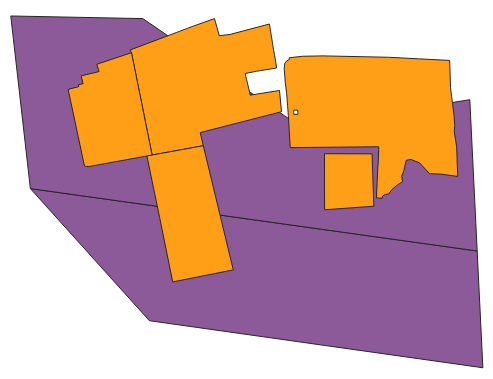
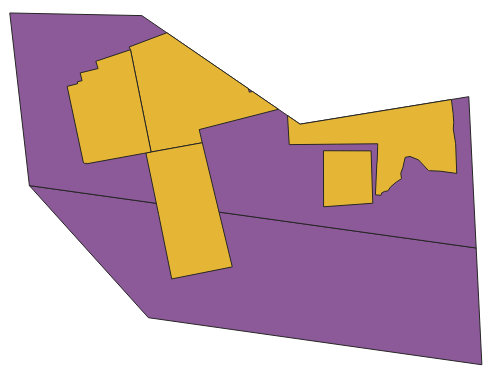
This is the result you can expect when clipping a polygon layer (yellow) with another polygon layer (purple):
Input
Clip result
- Parameters:
input_path (PathLike) – The file to clip.
clip_path (PathLike) – The file with the geometries to clip with.
output_path (PathLike) – the file to write the result to
input_layer (str, optional) – input layer name. If None,
input_pathshould contain only one layer. Defaults to None.input_columns (List[str], optional) – list of columns to retain. If None, all standard columns are retained. In addition to standard columns, it is also possible to specify “fid”, a unique index available in all input files. Note that the “fid” will be aliased eg. to “fid_1”. Defaults to None.
clip_layer (str, optional) – clip layer name. If None,
clip_pathshould contain only one layer. Defaults to None.output_layer (str, optional) – output layer name. If None, the
output_pathstem is used. Defaults to None.explodecollections (bool, optional) – True to convert all multi-geometries to singular ones after the dissolve. Defaults to False.
gridsize (float, optional) – the size of the grid the coordinates of the ouput will be rounded to. Eg. 0.001 to keep 3 decimals. Value 0.0 doesn’t change the precision. Defaults to 0.0.
where_post (str, optional) – SQL filter to apply after all other processing, including e.g.
explodecollections. It should be in sqlite syntax and spatialite reference functions can be used. Defaults to None.nb_parallel (int | None, optional) – the number of parallel workers to use. If None, the preference set in the nb_parallel configuration option is used, which defaults to the number of CPU cores available. For more information, see
options.set_nb_parallel(). Defaults to None.batchsize (int, optional) – indicative number of rows to process per batch. A smaller batch size, possibly in combination with a smaller
nb_parallel, will reduce the memory usage. Defaults to -1: (try to) determine optimal size automatically.subdivide_coords (int, optional) – the input geometries will be subdivided to parts with about
subdivide_coordscoordinates during processing which can offer a large speed up for complex geometries. Subdividing can result in extra collinear points being added to the boundaries of the output. If 0, no subdividing is applied. Defaults to 15000.force (bool, optional) – True to overwrite existing output file(s). Defaults to False.
See also
clip_by_geometry(): clip the input layer by a geometry specified