geofileops.union_full_self#
- geofileops.union_full_self(input_path: Path, output_path: Path, *, intersections_as: Literal['COLUMNS', 'LISTS', 'ROWS'], input_layer: str | None = None, output_layer: str | None = None, columns: list[str] | None = None, explodecollections: bool = False, gridsize: float = 0.0, where_post: str | None = None, nb_parallel: int | None = None, batchsize: int = -1, subdivide_coords: int = 2000, force: bool = False) None#
Calculates the “full” union of the features in a layer.
Warning
This function is experimental and may be changed and/or renamed in a future release without backwards compatibility!
All geometries in the input layer are cut up till the smallest possible parts based on the intersections between them.
The way intersecting (parts of) features are treated in the output depends on the
intersections_asparameter.The following plot shows the result of a full union on a layer with intersecting features. The labels on b) indicate the number of features that intersect in the input layer on that location:
(
Source code,png,hires.png,pdf)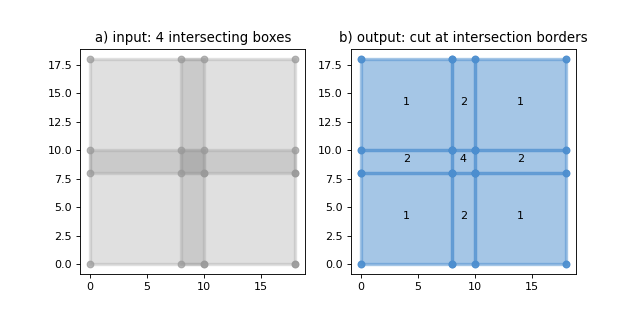
Remarks:
The result can contain attribute columns from the input layer. The attribute values wont’t be changed, so columns like area,… will have to be recalculated manually if this is wanted.
To speed up processing, complex input geometries are subdivided by default. For these geometries, the output geometries will contain extra collinear points where the subdividing occured. This behaviour can be controlled via the
subdivide_coordsparameter.Sliver polygons are removed from the output by default. Polygons are considered slivers if they are narrower than a certain tolerance. By default this tolerance is 0.001 CRS units if the CRS of the input layers is a projected CRS, 1e-7 if it is a geographic CRS. More information + information how to change this default tolerance can be found here:
options.set_sliver_tolerance.
Added in version 0.11.0.
- Parameters:
input_path (PathLike) – the input file.
output_path (PathLike) – the file to write the result to
intersections_as (Literal["COLUMNS", "LISTS", "ROWS"]) –
determines the way intersecting features in the input layer are treated in the output. Possible options are:
”COLUMNS”: the output won’t contain any intersections between geometries. The columns in the output are prefixed with “i1_”, “i2_”, etc., where for each extra intersection on a location a new set of prefixed columns is created. E.g. for an input layer with 1 column “test” where a location is covered by 3 input features, the output will contain 3 columns: “i1_test”, “i2_test”, and “i3_test” with each column having the attribute value of one of the intersecting features on that location. For features with less than the maximum number of intersections, the extra columns are NULL.
”LISTS”: the output won’t contain any intersections between geometries. The columns to retain will be available in the output as well, but their values are stored in a list the length of the number of intersections. A column “nb_intersecting” is added to indicate the number of intersections per feature. Hence, if a location of an input layer with 1 column “test” is covered by 3 input features, the output will contain 2 columns: “test” and “nb_intersecting”. For a location with 3 intersecting features in the input layer, “nb_intersecting” will be 3 and the value in the “test” column will be a json list with 3 values, each being the attribute value of one of the intersecting features on that location.
”ROWS”: each location where the input features intersect is repeated the number of times that area is covered by an input feature. Hence, the output may contain intersections between features. Attribute columns are retained, whith each intersection having the attribute values of one of the intersecting input features on that location.
input_layer (str, optional) – input layer name. If None,
input_pathshould contain only one layer. Defaults to None.output_layer (str, optional) – output layer name. If None, the
output_pathstem is used. Defaults to None.columns (List[str], optional) – list of columns to retain. If None, all standard columns are retained. In addition to standard columns, it is also possible to retain custom columns by specifying their names in this list. Note that the “fid” column is always retained even if not specified here. Defaults to None.
explodecollections (bool, optional) – True to convert all multi-geometries to singular ones after the dissolve. Defaults to False.
gridsize (float, optional) – the size of the grid the coordinates of the ouput will be rounded to. Eg. 0.001 to keep 3 decimals. Value 0.0 doesn’t change the precision. Defaults to 0.0.
where_post (str, optional) – SQL filter to apply after all other processing, including e.g. explodecollections. It should be in sqlite syntax and spatialite reference functions can be used. Defaults to None.
nb_parallel (int | None, optional) – the number of parallel workers to use. If None, the preference set in the nb_parallel configuration option is used, which defaults to the number of CPU cores available. For more information, see
options.set_nb_parallel(). Defaults to None.batchsize (int, optional) – indicative number of rows to process per batch. A smaller batch size, possibly in combination with a smaller
nb_parallel, will reduce the memory usage. Defaults to -1: (try to) determine optimal size automatically.subdivide_coords (int, optional) – the input geometries will be subdivided to parts with about
subdivide_coordscoordinates during processing which can offer a large speed up for complex geometries. Subdividing can result in extra collinear points being added to the boundaries of the output. If 0, no subdividing is applied. Defaults to 2000.force (bool, optional) – overwrite existing output file(s). Defaults to False.
See also
union(): calculate the pairwise union of two layers